Saturday, October 11, 2014

WORN COVERS TUTORIAL FOR COMPENDIUM OF CURIOSITIES III CHALLENGE

Hello everyone!  Welcome to the weekend!

It's time for our 13th challenge over at Studio L3's 

Are YOU being curious? In my first Compendium of Curiosities book, Tim Holtz autographed it by saying "Be Curious!"  That always stuck with me. I have always been curious about how different mediums work with each other and how to construct different things.  Being curious leads to creativity and as my blog is titled, "Creativity Is Contagious!"

And since these challenges are for those of us who love Tim's techniques, his products and his ability to inspire all of us .... have you seen this beautifully done video of Tim sharing  his creative journey and what inspires him?  If not, you really need to check it out! THIS is the essence of Tim and it will make you fall in love with him all over again! It's a very candid interview where Tim allows people into his personal space to gain a better understanding and I think more appreciation for who he is and what motivates him.  I loved it!

Okay...back to the current challenge! This challenge is not a technique challenge although I'm sure there will be lots of techniques used in putting your project together.  Turn to page 35 in your Compendium of Curiosities III book and check out "Worn Covers".

I love these guys!  There are several different styles ranging from The Journaler (even comes with a special Christmas Wishes cover) , The Diary, The Chronicle and the one I chose to use for my project, The Composition. 

It is a 5" x 7" cover. There are also inexpensive pocket inserts that you can purchase to hold tags, photographs, memorabilia; all sorts of things.  Or, you can make your own interior pages and attach them with Tim's Ring Binders. That is what I plan to do with my little book...add some of my own art journaling pages with my own sketches and experimentation with water color.


This is my completed Composition Worn Cover book.  Each little book is like a blank canvas.  They are way cool without doing anything to the covers.  But, when you add your own personality to the cover, you really can create some great art. I think when you add all sorts of stuff to them, they are just begging to be picked up, opened and enjoyed.

I began with just the basic Composition Worn Cover.  I put together a collage of "stuff" from several of Tim's products: Found Relatives, a #8 manila tag, pieces of ephemera from Tim's Thrift Shop and Expedition Ephemera Packages, some Filmstrip Ribbon, a File Tab, "TOGETHER" from Tim's Framed Alpha Parts, an arrow Index Label, a Journal Ticket, a Mini Paper Clip, and a pretty die cut butterfly that I cannibalized from anther art project.  It has a small Tim Light Bulb on it.  


I started with the #8 Manila Tag that I had torn away the outside edge and distressed it using Gathered Twigs Distress Ink.  To that, I added another piece of manila cardstock that was torn on all edges, and colored using Wild Honey and Gathered Twigs Distress Inks.  I also did Tim's Spritz and Flick method on them and added Black Soot to the edges of everything. To add more interest, I stenciled Tim's Latticework design using my Broken China Distress Marker attached to Tim's Spritzer. Then I added a Chevron strip using Black Soot Distress Ink.  I glued the distressed design on top of the tag and added a layer of lace and trim from Tim's Naturals Trimming Set. For a little more interest, I added a Journal Ticket to hang over the edge of the Worn Cover.  I used the "1" from Tim's Rubons and put it on the back side of the ticket. Then I added some black machine stitching all around the edges.  I would add a few more embellishments later on, after I started laying out the cover and see where this design wanted to go.

I love Tim's Ephemera Packs.  I used some pieces out of Thrift Shop and also Expedition on this cover. I added some Peacock Distress Ink and a light spritz of Mint Perfect Pearls Mist to the map.  I added some Treasure Gold Silver Guilding Wax to the outside edge of the clock face (because most of my metal elements are silver).  Then I began to lay everything out.


I glued my distressed map piece in place in the upper left side of the cover. I would build the rest of the collage from this point.


Across the top of my Worn Cover, I added a piece of Tim's Industrious Border Stickers.  They are adhesive on the back but I also added a 1/8" strip of Scor Tape just to give it a double stick.  Then I laid down my clock face and the Filmstrip Ribbon.  The piece of Filmstrip Ribbon is glued in place using Glossy Accents.  It dries clear and is perfect for adding clear elements like the Filmstrip Ribbon. 


I began adding Ideaology elements to my collaged tag.  I cut out the sweet little brother and sister from Tim's Found Relatives and went around all of the cut edges with a Black Soot Distress Marker (to hide the white paper edges).  I added some Antique Linen over them to really give them a rich, antiqued appearance.  Then I secured some twine around the bottom of the tag and glued my brother and sister in place.  I added the "memoirs" File Tab at the top of the collaged tag, adding a piece of tied twine before I stuck it in place.  The "TOGETHER" Alpha Parts piece was glued onto a piece of cardstock that had been sprayed with Dylusions Calypso Teal Spray. On top of the black Alpha Parts, I added touches of Gold Paint Dabber.  Then I glued all of that on top of a piece of tattered vintage lace and glued it in place on my collaged tag.  Another little accent that I added at this time was the Mini Paperclip on the upper left of the collaged tag.  Funny how just little things like that add so much interest! 


Then I added the collaged tag to the Worn Cover front, using 1/4" Scor Tape.  Once my cover was in place, I decided to add the dimensional butterfly.  She adds that extra touch of femininity that I wanted to bring to this cover.  I also popped the arrow Index Label with a partial sentiment from Tim's Simple Sayings stamp set on it.  The original sentiment says "Enjoy the journey".  I didn't have enough room for all of it, but I liked "the journey". 


In the upper right corner of the Worn Cover, I added one of Tim's Faucet Knobs and dangled an "INSPIRE" Philosophy Tag from it using a Jump Ring.  Now, this tag was originally an antique gold.  But I wanted it a dirty silver.  So, I simply painted over the finish with a Silver Paint Dabber and heat set it.  Then I used the Pitch Black Paint Dabber to rub over the face of the tag. Before it dried, I wiped away almost all of the black paint but leaving it in the engraved "INSPIRE 3197".  The other small amount of black paint that I left on the face gave it a wonderful distressed look. Love it! I added the Faucet Knob with Glossy Accents.  I always love projects that have moving, interactive pieces on them.

 (This photograph is shot on the interior side of the Worn Cover book. This shows the Ring Binder being held in place on the spine with Tim's Naturals ribbon.)
 
Now it was time to add the Large Ring Binder to the interior.  The Ring Binders come with brads and if you want to just pop them in place, you can do that and you're done.  But, I wanted to create something a little more fun.  So, I used some of Tim's beautiful Naturals Trimmings ribbon to add my Ring Binder.


I simply started on the outside of the Worn Covers spine and pulled my ribbon through the bottom hole, including the bottom hole of the Ring Binder.  Then I pulled the ribbon up through the Ring Binder and pulled the ribbon through the holes at the top of the binder and the spine.  Once the ribbon was back on the outside of the spine, I simply tied it into a decorative knot, added another piece of the same ribbon and a piece of a different ribbon and tied knots. You could stop here but why do that?  Time to add more "stuff" and make the book even more interesting!!


I used a small Swivel Clasp as the base for my dangling charms.  It was connected within the knots and then I simply added the charms to the chain on the Swivel Clasp using small Jump Rings.  I used two Baubles at the top, then a silver Locket Key, a silver Buckle and a silver Word Stick at the bottom.  
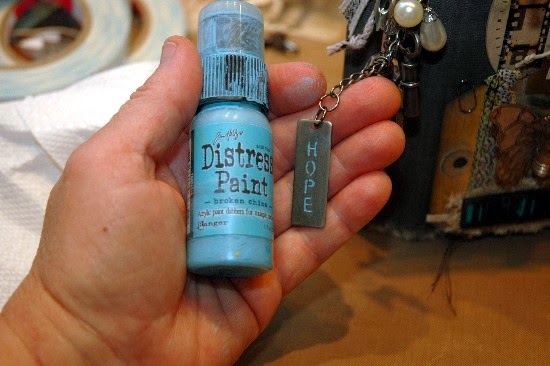

I added some Broken China Distress Paint to the stick to emphasize the word that is engraved into it.  I wiped away the excess paint, leaving it only on the embedded "HOPE".  I decided to add one more metal piece at the very top of the dangling charms.  I used a Pen Nib but it didn't have a hole to make it a charm.  NO PROBLEM! 


I simply used my Tim Holtz Punch to "drill" a small hole and then I could easily add it to the knots with a small Jump Ring.  


It filled up that little bare spot perfectly!  Love it!  


For now, I am going to leave my interior of the book exactly how it comes.  It's already got that distressed look and once I start adding my art journal pages, I don't want them to compete with the insides of the book.

I did this book in no time and you can, too!  Then enter our challenge over at Compendium of Curiosities III.  Be sure to follow the few simple rules when writing your blog post and you'll be on your way to maybe being one of our TWO lucky winners!  

This challenge is being sponsored by the very generous folks at ...

http://www.inspirationemporium.com/

Can you believe it?  A $50.00 gift certificate could be yours if you are chosen the winner of this challenge by the Curiosity Crew.  But that's not all ...

Tim and Mario, those gracious guys of gratitude and all things good, have also donated really REALLY REALLY nice prizes to be given at each challenge.  So, you have TWO chances to win!  

Be sure to check out all of the amazing projects created just to inspire you by the Curiosity Crew!  And THANK YOU for all of your continued support and wonderfully uplifting comments.  They mean the world to me!

GOOD LUCK!  I can't wait to see all of the beautiful Worn Covers that will be displayed over at Compendium of Curiosities III for everyone to enjoy!   


Saturday, September 27, 2014

COMPENDIUM OF CURIOSITIES III CHALLENGE ~ DISTRESS PHOTO TINTING

Happy Saturday everyone and Happy Fall. Welcome to my blog and another new challenge from Linda Ledbetter's Compendium of Curiosities Challenge over at Studio L3.

This is already our TWELFTH in the Tim Holtz Compendium of Curiosities Challenges.  Can you believe it? Time flies so quickly and as the holidays are fast approaching, I fear that the ol' hands on the clock will spin even faster; counting down the days until Christmas.

The entries we received for our Effect Powders challenge were amazing! It is always so hard for the Curiosity Crew to pick one best project because there are SO MANY special ones. Thank you for sharing your wonderful ideas and art with all of us and thank you for your continuing positive and uplifting comments.

** I would just like to take a second to remind everyone that there are a few simple rules to be followed for this challenge. If you have any questions about them, click here. There have been a few entries that have failed to link up to our sponsor and/or link to our Compendium of Curiosities Challenge on your individual blogs. We also respectfully request that everyone please participate in this challenge with how it is intended to be ... a community to share our "take" on Tim's techniques and products, not as a means to advertise and promote your own business or organization. 

We don't want ANYONE to miss out on the wonderful prizes that are awarded to TWO lucky winners each challenge. You guys work so hard to create such lovely and worthy projects. Please take the extra couple of minutes in your blog posts to be sure you're in compliance.

Now, time for the FUN!  Turn to page 41 in your Compendium of Curiosities Books and check out the technique for Distress Photo Tinting.  I love this technique because it can take any black and white photograph and through the magic of Tim's technique, it can be transformed into a vintage looking keepsake.

Because this technique really does lend itself to vintage work, I decided to start thinking about Christmas and create something that I can use long after this challenge as a home decor piece.  

Using an inexpensive wooden frame from a chain craft store, Tim's Merriment Paper Stash, some of his Woodlands Bottle Brush Christmas Trees and Wreaths, Tim's Mirrored Stars, some ephemera from Tim's new Christmas Ephemera Pack and a few other little "goodies" I had in my Christmas stash, this sweet little frame came to life.

I began by painting the edges and the peg stand of the 8 1/2" x 6 3/4" wooden frame with Tim's Barn Door Distress Paint. Once dry, I distressed it using Aged Mahogony Distress Ink to deepen the red and match the polka dot paper I used as my background from Tim's Merriment Paper Stash. 


I traced around the wooden frame, cut out the paper and glued it in place on the frame.  I sanded all of the edges so that the paper and the wood were better fused together.  Then I added Antique Linen to the paper front to soften the stark white to a more antiqued linen look. That was set to the side so that I could start working on my embellishments.

My inspiration for this vintage Christmas frame originated with a simple snow globe type of stamp that you will see in a moment. I thought it would be a wonderful way to showcase Tim's Distress Photo Tinting Technique by placing a vintage photograph in the globe.  For me, what makes this technique even more appealing is when you just pick out one or two things to emphasis through color, leaving the rest black and white. 


Look at this sweet little face!!! I found this sweet vintage photograph in one of my saved images on my computer and sized it to fit my snow globe. The expression on this little child's face is what Christmas morning is all about; wonder, surprise and the magic of Christmas! I will not divulge Tim's technique for photo tinting but I will share with you the colors I used: Milled Lavender on the cheeks and Tumbled Glass on the gown.

One thing I will say about this technique is I found that when using the Distress Markers, the color they give off is pretty vivid. I wanted my colors to be very soft.  So, I dipped the point of my Distress Marker in water to dilute the ink and then applied it.  I also had a Detailer Water Brush handy to also dilute and smooth out the colors.


Next I stamped the snow globe twice onto Specialty Stamping Paper using Coffee Archival Ink and then sprinkling just a little Queens Gold Embossing Powder over the ink while it was still wet.  I removed the excess powder and then heat set it and colored it using Pine Needles, Aged Mahogany and Gathered Twigs Distress Inks and a Detailer Water Brush. Once that was dry, I added some Texture Paste to represent snow on the pine cones and then sprinkled some fine glitter on top of the wet Texture Paste for even more of a freshly fallen snow look. (I would later add more snow to the top of the globe after I put it together). 


Next I colored just the globe portion of the second image I had stamped out and cut it out. I fussy cut around the globe and colored it with a Scattered Straw Distress Marker. Next I cut out a piece of clear transparency film and glued it to the underside of my top globe to represent "glass". I glued the vintage colorized photograph underneath the original globe. Then I pop dotted the "glass" globe on top of the entire image. 

 
 The snow globe all put together with snow added to the top.

I also added a piece of kraft cardstock to what would be the exposed half of the back of the snow globe. Then it was time to add the snow on top, the glitter and set it to the side to dry.  I think the snow on top is cute and I carried the freshly fallen snow theme throughout the entire frame ... because it was on top of the pine cones on the original stamp.

The trees have snow on them in later pictures.

I have not received my new packages of Tim's Bottle Brush Christmas Trees yet, so I pulled out the smaller one and two wreaths from a couple of my Woodlands packages that I had on hand. The trees and wreaths are an ivory color, allowing you to spray them whatever color you want them to be.  I chose to use Peeled Paint Distress Spray as my base and a light top coat of Pine Needles to vary the green color of the needles. I cut the back sides of the trees off as I knew they would be glued onto my frame and I needed them to be flat. Then I hot glued some little "glass" ornaments ( beads from some old Christmas garlands I had) into the trees and wreaths. I also hot glued two Mirrored Stars that had been lightly painted with a Silver Paint Dabber on the tops of the trees. 


Finally, I added some more Texture Paste and glitter to the trees and wreaths let them dry. 
I love ALL of Tim's ephemera from his new Christmas Ephemera Pack. So many nostalgic images!  It was hard to decided which ones would be perfect for my frame but I managed to narrow it down to the red "Icicles for decorating Christmas Trees" banner going across the top of the frame, the "Shiny Brite" ornament box end underneath the Icicles banner, the "25" tag that I added jingles bells and candy canes behind, the sweet little gift tag (that I added Patina, Eucalyptus and Candy Cane Stickles accents to) attached to the right wreath, and MY FAVORITE PIECE FOR THIS FRAME ... the wonderful Tinsel Rain Icicles box lid.


This was so stinkin' cute that I just had to make it more of a dimensional piece and made a box for it, complete with "tinsel" inside.  To do this, I simply laid down the image, drew around it, added 1/2" all the way around it, cut it out and folded it on the pencil lines.  Then I just clipped the ends and made two box lids. One would be the bottom, the other would be the top.  


I cut out the green Christmas tree on the image because I wanted the top to be a see through box lid, showing the silver tinsel inside. I also cut away the kraft top underneath the cut out Christmas tree on the image.  Then I placed a piece of transparency film on the underside of Tim's image and glued it in place. Then I glued the ensemble on top of the kraft box lid and inked the edges first with Gathered Twigs and then Black Soot. 


I created the "tinsel" out of the silver Foil Tape Sheets cut into thin strips long enough to attach to the top and bottom of a piece of kraft paper cut to fit inside of the box.  I left the backing on the strips except for the two ends that were joined to the backside of the kraft paper insert. Then I added a little Glossy Accents to the interior ends of the box and glued the lid onto the bottom.  


Now it was time to put everything together, mainly using hot glue to attach everything. I found a cute little string of lights and wound it through the weaths and across the top of the frame.  Here you see the Icicles and Shiny Brite Christmas Ephemera. I also added a thin line of Platinum Stickles around the Shiny Brite strip.


I added more Texture Paste and glitter to carry on with the snow theme on the top of the frame and on top of the Tinsel Rain Icicles box.  Then I set the frame aside to try. Here you can also see the sweet little vintage gift tag highlighted in Stickles from Tim's Christmas Ephemera Pack.

Now for more of Tim's Distressed Photo Tinting on another very sweet picture that I will put in the frame.  This is a 4" x 6" photograph that will probably be replaced with a photograph of my grandchildren each Christmas ... but I may make their photo black and white and do this photo tinting technique on it!!


The colors I used to colorize the clothes are Tattered Rose and Tumbled Glass.  But, you will need to check the technique on page 41 of the Compendium Of Curiosities book because there is more to the technique than this!  One more thing that I added to this photo which is NOT a part of Tim's technique is the silver "tinsel" I added to the Christmas tree branches in the foreground of the picture.  I lightly dabbed the photograph with Silver Stickles in areas where garland or tinsel was hanging. I love the little bit of "glitz" it adds without being overpowering.


Finally, I added the photo tinted vintage photograph to the frame. I love how the two little Distress Photo Tinted photographs compliment each other. And ...

 
I love how they look in the vintage frame!

Now it's YOUR turn to find the Distress Photo Tinting Technique on page 41 of your Compendium of Curiosities Book and then create something vintage-ly wonderful. Link it up to our challenge and you could be the lucky winner of one of our two very generous prize packages.

Our sponsor for this challenge is the the lovely Linda Coughlin of the ...


She is offering a $25.00 gift certificate.  She has an incredible store with GREAT prices!

We also have a mountain of prizes donated by Tim and Mario especially for our challenge participants. You won't believe the wonderful prize packages Linda send out each challenge.

So, good luck!  I can't wait to see the photographs you choose and your tinting techniques.

Saturday, September 13, 2014

COMPENDIUM OF CURIOSITIES CHALLENGE ~ HALLOWEEN CANVAS

Happy Saturday and welcome to my blog!

I hope everyone is having a good week. The temperatures here are turning more fall like ... something I am really looking forward to!

It's time for another new Compendium of Curiosities III Challenge over at Linda's Studio L3. The challenges are based on the wonderful books featuring techniques and products of our favorite Vintage/Grunge/Distress Guy, Tim Holtz. How DO you describe him?

You guys are rockin' these challenges with some really amazing art! I truly mean that and THANK YOU for all of the very positive and complimentary comments!

Your Assemblage Clocks from the last challenge totally blew me away! I've never seen so many beautifully done clocks in one place ... EVER!  They are all so original and beautifully done! Choosing a winner is always so tough for the Curiosity Crew! You guys have NO IDEA! The effort that everyone is putting into your creations each week really inspires all of us.  It is so fun to share all of this amazing art!

That being said, turn to page 52 of your Compendium of Curiosities III book and check out this week's theme; "Effect Powders".  


My creation for this week is a 6" x 12" Halloween themed canvas. My inspiration for the canvas came from this sentiment that I saw on a plain little Halloween plaque at a store.  It "toadily" cracked me up and I knew that I wanted to make something fun with it.  
So ... here it is!

I will give you as many details as I can without "toadily" giving away the Effect Powders technique. I did several variations of the technique on my canvas.


This is where I began ... with Tim Holtz' spooky Iron Work Gate die cut on a piece of textured black cardstock. I swiped my Silver Paint Dabber over the entire surface to give the fence more of a metallic effect.  Here you see the fence half way completed. What a difference the swiped paint makes!


Next I added Distress Embossing Ink and Antiquities Verdigris Embossing Powder to give my fence a more aged and patina look.


Here is the finished fence. Love it!


Next I created Tim's creepy Headstone die cut from Plain Grungeboard and Weathered Wood Distress Embossing Powder.  Weathered Wood really is a pretty cool stone looking color and mixed with Black Soot Distress Ink, I think it came out looking like old weathered stone or concrete headstone.  I also added a touch of the Verdigris Embossing Powder over the Effect Powders technique to give a bit of a mossy, patina look to the headstone. I added the Mini Bat to the center of the headstone using the same techniques that I did on the headstone. Finally, I gently rubbed just a touch of Amber Green Treasure Gold Guilding Wax on some edges of the headstone and the bat. 


I was not sure where this canvas would end up when I started, so I also used the Effect Powders technique on these other Mini Bats and the dangling Spider I thought might come in handy.  I used Weathered Wood Distress Embossing Powder coupled with Black Soot Distress Ink on all of these. 

Now that most of my embellishments were finished, it was time to move on to creating the canvas.


I began with a 6" x 12" canvas. I covered it with Tim's Terminology Tissue Wrap and Matte Multi Medium. Once that was dry, I randomly added some "stones" to the perimeter using Wendy Vecchi's Brick Wall Stencil and her Crackle Texture Paste.  I love those things!  When that was dry, I added Tim's spooky Halloween themed Tissue Tape all around the edge of the canvas, completely securing it in place with 1/2" Scor Tape underneath.


By now, I was REALLY into the project and I wanted to get my hands all inky or painty.  So, I spritzed the canvas with water and mixed some Wild Honey Distress Paint and a little water on my Non Stick Craft Sheet. Let the finger painting begin!  I had so much fun covering the entire canvas, smearing the paint and water mixture all over it with my fingers.  When that was dry, I added some Rusty Hinge Distress Ink around the perimeter to deepen that orange-ish color and give more of a vintage feeling to the canvas.


Next I colored the "stones" with my Weathered Wood Distress Marker and gently tapped them with my Distress Embossing Ink Pad.  Then I pinched some Weathered Wood Embossing Powder between my fingers and sprinkled it over the stones. I brushed away any excess powder with a small paint brush.  Then I heat set it in place to give a rougher more stone like feeling.


I also added a bit of Embossing Ink around the edges of the canvas, sprinkled a little Weathered Wood Embossing Powder, brushed away any excess and heat set it in place. Then I added some Black Soot Distress Ink accents to all. I love the gritty, stone like look and feel of the edges.

Next I cut out all of the letters for my sentiment using Tim's Spooktacular alphabet die cut. I cut all of the letters out of textured black cardstock and set them to the side until I was ready to glue them in place.


 I LOVE my frog!  He's got some serious personality going on! I found him on the internet and sized him to fit behind the headstone. I backed him with kraft cardstock and then cut him out. I edged him with a Black Soot Distress Marker and gently covered him with Antique Linen Distress Ink to soften his pearly whites into a softer more vintage off white.  Before I glued him in place behind the headstone, I created a dimensional witch hat pattern out of the textured black cardstock and fashioned it for him. I added a bit of torn black tulle as a hat band.  I also added some Stardust Stickles to his "sparkle" of his smile.  Then I glued him in place behind the headstone and glued the headstone in place on the canvas.


Next I glued my little spooky dimensional tree that I found at the Dollar Store to the far left of my canvas. After gluing it in place, I could figure out the spacing for my letters.  The "13" is created from Tim's Mini Numerals that were heat embossed with Black Soot Distress Embossing Powder.  Once cool, I added some little black pop dots to the back. I laid out all of my letters and then systematically glued them all in place. Then I added the die cut Mini Bats. To make the letters even more dimensional, I added Glossy Accents over all of the letters. It didn't take them long to dry.

I added several layers of black pop dots behind sections of my fence and popped it into place in front of the tree and the headstone. The pop dots gave it added dimension.


After getting all of the canvas completed, I knew that I wanted to add a broom.  Therefore, I would need a place for broom to "park".  So, I hot glued these little skeleton hands that I have had for some time. I found them at Michaels. I added a bit of some mossy stuff that I found at the Dollar Store and glued the skull out on to the hands enough so that the broom handle would fit behind it.  The skull is a little plastic one that I had from Michaels.  I painted over it with an ivory acrylic paint and then washed it with a Burnt Umber and water mixture.


My broom was made from a stem of a flowering stem thing I had on hand.  The broom part of the broom were thin twigs that I actually cut off of a bigger broom looking thing that I had.  I hot glued the twigs around the stem and then wrapped them first with some twine and then with some orange raffia. Done! ... and so easy!


My little tree looked a little "naked" so I added a scrap of tea dyed cheesecloth I had laying around. Better!


Here is a closeup of my funny violating frog, stylin' in his witch's hat with his crafty little grin.  He seems to be getting a chuckle out of the sentiment, too!


Here is my finished canvas with no broom in place. I love the skeleton hands! They add a lot of dimension and fun to the canvas.


And here is the canvas with the broom resting securely in the skeleton hands. I better hurry up and finish this blog post!  I only have 13 minutes and then I may be "toad"!

Thanks so much for stopping by and letting me share this tutorial with you.  I hope that I've inspired you to jump into your Compendium of Curiosities book and check out the Effect Powders technique.  IT'S NOT HARD AT ALL!  Then create something wonderful using the technique and link it up to the challenge. You could be our lucky winner of either a very generous ...

http://www.inspirationemporium.com/

or a treasure trove of Tim Holtz products donated by the man himself!  

Have fun with this challenge!  
I can't wait to see everyone comes up with this time around.

GOOD LUCK!